Quick Overview of some the stuff that I've done at work
GoPhish Campaign
Org-wide phishing awareness & lessons learned.
Network and its Challenges
Building & stabilizing the office network.
Learning Management System
Lightweight internal training platform.
The Intranet That Almost Was
Laid the foundation for an internal hub.
IT Asset Management Tool
Centralized asset tracking for Managers.
Wazuh and its intricacies
Exploring security monitoring in a home lab.
PRTG - Monitoring infrastructure and more
The best network monitor tool I've found.
Solar Winds Kiwi Syslog Server
A basic network logger
Secret Santa for the organisation
A lighthearted project with a security twist.
GoPhish - Running a successful Phishing Campaign
The Problem
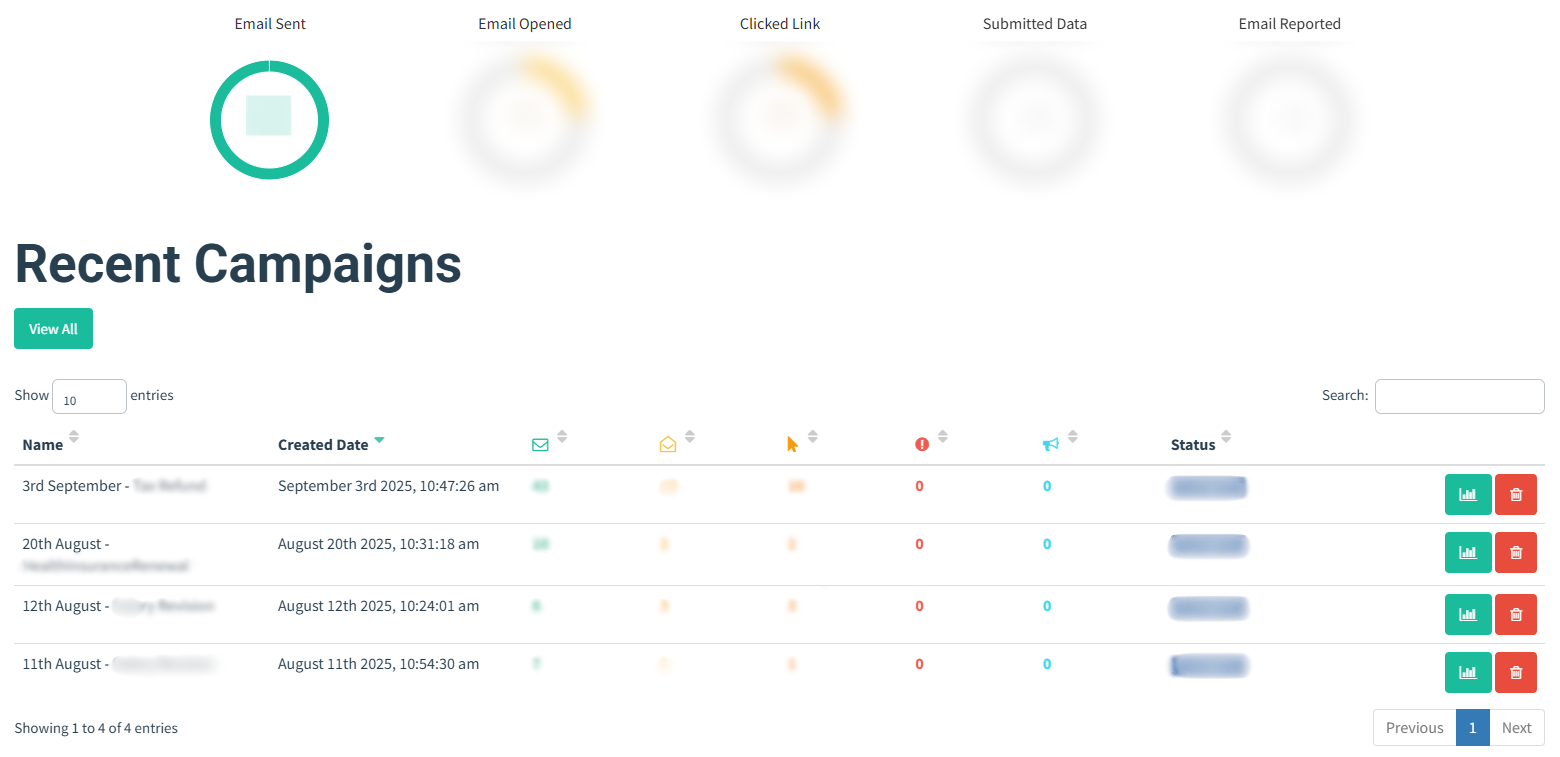
Phishing remains one of the biggest Cybersecurity threats—because it only takes one wrong click to create a major incident. In our organization, phishing emails would surface every now and then, raising concerns around user awareness and how prepared people were to react. As part of our Annual Security Awareness Program, I conduct training sessions and then follow them up with organization-wide assessments to ensure compliance and understanding.
The larger goal wasn’t just testing people—it was to:
- Spot teams or individuals who need extra guidance.
- Promote reporting instead of silence.
- Make awareness a habit, not a formality.
- Ensure everyone knows what to do if they receive or click a phishing email.
Tools & Setup
To run the campaigns, I used:
- Gophish — Open Source Phishing Framework
- An AWS t2.micro Instance with cloud security policies enhanced for hosting the phishing server (went with this since the framework is very lightweight)
- Spoofed Domain purchased from Hostinger and a SMTP server also from Hostinger to send the phishing email.
- Drafted the Scenarios and Reports on Excel.
Designing the campaigns meant crafting believable scenarios but with careful attention so that it wouldn’t feel like it was coming from someone inside the organization. A phishing campaign is only as effective as its storyline, so getting that balance right was crucial.
What I Learned
One unexpected takeaway is that people hesitate to report the phishing after clicking the link because they were worried of being singled out. It helped me shift focus on giving positive reinforcements and encouraging the management team to do the same so individuals felt safe reporting incidents quickly.
Additionally, sharing a playbook for specific types of incidents helps ensure quick reference and faster response actions from everyone.
Also understood that awareness works best in small doses continually instead of one big annual session. Dropping short reminders from time to time on general chat can help a lot !
Toughest battle - Networking
The Problem
Transitioning from SCCM Admin to an IT Admin of an organization is HARD. It comes with a lot of global challenges that go far beyond managing and being an admin of a particular tool or platform. Having no one to go to, limited industry experience and only a basic understanding of networking, building and managing an IT Network infrastructure of an org from scratch can be tough. This is the area where I had the most challenge in keeping systems running and keeping users sane, because everyone hates a slow network. Even me.
Pushing to PROD :
Unlike in development where there are separate environments ( even SCCM had it ) - Test, Pilot, Prod. In Org networking there is only one environment “the people” or rather PROD. Every change had to be made late at night and almost always came with new challenges the next day. Already being a big org with 70+ users and 200+ devices it was difficult to predict the full impact of each change. Every adjustment carried selective and calculated risks, and implementing major changes required extensive analysis and careful planning.
The OTT Challenge :
The goal is to make industry leading video products which meant streaming is at the forefront, demanding massive bandwidth. The environment I managed has TVs , Mobiles, Tablets, STBs, consoles and laptops. Getting Bandwidth to laptops is one thing; getting the same to all the other devices, all streaming in different resolutions, by multiple Teams was an entirely different challenge. TVs were particularly hard as they have weaker wifi modules which frequently caused streaming issues and connectivity drops.
Tools & Setup
In my arsenal I had a fixed Bandwidth and the usual networking instruments. Here’s are few changes I made to address the challenges without divulging too much.
Web Filter - We can’t always control how users consume bandwidth. Implementing web filtering helped me direct bandwidth where it mattered most. I learned the importance of whitelisting and maintaining an exception group, especially since TVs often react differently to network restrictions and there's always something new thats getting blocked.
MAC Binding - Initially, any device could connect to the network, it was a bandwidth and security risk. I collected all device MAC IDs, bound only the approved ones, and blocked the rest. It wasn’t a popular move among my peers, but it was necessary to stabilize and secure the network.
Traffic shaping - When I joined, there was no traffic shaping in place, I still wonder to this day how the org survived without it in its initial days because one device can literally eat up the whole Bandwidth and this used to happen for the first 4 months when I had limited access. Being new I had no clue but Reddit became my classroom for understanding and implementing traffic shaping policies. After multiple trials, I found the right balance to keep both users and the network stable.
LAN connection - Wi-Fi wasn’t reliable, especially for TVs with weak modules. I borrowed a LAN tester from our ISP Vendor team, mapped the patch panel, and set up dedicated LAN bays for the QA team to test TVs without bandwidth and signal issues.
Challenges from Bandwidth Constraints - Bandwidth is like the size of the room you can operate in — exceed it, and systems start failing. Every change had to be made with bandwidth in mind. Monitoring became a daily ritual, especially during client meetings and demos, with quick policy adjustments to keep everything within safe limits.
Requirements of the OTT Industry - There are many components in an app, and understanding how each interacts with the internet is crucial. Firewall restrictions, certificate issues, and failed API calls all need to be analyzed and worked around effectively with the other departments.
What I Learned
The goal is not the perfect network with highest bandwidth to everyone, 0% latency and 0% packet loss but the MOST STABLE one. One which people can rely on for their day to day operations. All the challenges I faced ultimately helped me reach a point where I established a stable and reliable network connection for my org.
Still more work to be done, always room for improvement !
Learning Management System using Google Sites
The Problem
I was asked to deliver the annual Cybersecurity training for the entire organization, but there was no platform to host or distribute the content. I knew sharing it as a PPT via email would not make sense and people wouldn’t be interested in going through it.
Tools & Setup
I used Google Sites to build a lightweight, secure LMS-style platform. It allowed me to host the training material, control access, and organize modules in a clean format. From there, I shared it with all employees and tracked participation through a simple internal processes.
- Created a centralized space for Cybersecurity training content.
- Organized modules, policies, and assessments in a structured format.
- Made it easy to access without needing paid LMS software.
Impact
The same portal is now used for IT onboarding of all new employees, along with the live onboarding session.
No more PPTs. The same is shared along with the compliance assessment.
It became a repeatable process instead of a one-time workaround, so new joiners and existing staff get the same standardized training without any extra tooling.
The Intranet That Almost Was
The Problem
Every organization has an internal intranet, a central hub where users can review policies, apply for leave, access the employee directory, find essential forms, and stay updated with the latest news and events happening with the organisation. We've never setup anything like that. And also we needed to create a unified platform where all users could easily access the company handbook, along with the IT and security policies. So I was asked if something like this could be setup, Although it took 2 years and a lot of iteration to come out, it eventually did and now we have a platform for hosting policies and procedures in one place instead have links scattered here and there.
Tools & Setup
Similar to how I setup the LMS system, I used our Internal Google Sites to build a central hub for all our company info.
- Created a centralized space for IT and Security Policies.
- Organized department-wise policies in a structured format.
- Created a centralised dashboard with icons for users to quickly navigate to all forms and links.
- Added my own easter egg space where users can click to see photos of company events and activities.
- Setup a basic Intranet without any additional expense.
SnipeIT Asset Management Tool
The Problem
IT assets were scattered across a shared spreadsheets used by multiple departments with inconsistent serials and ownership, which made device tracking a nightmare, especially in an environment where there are many remote users. Not to mention the annual asset auditing ! Managers had no way to see who had what and always had to wait for ME to get back to them with the details.
Tools & Setup
To efficiently track assets and help managers identify which employee had what, I used:
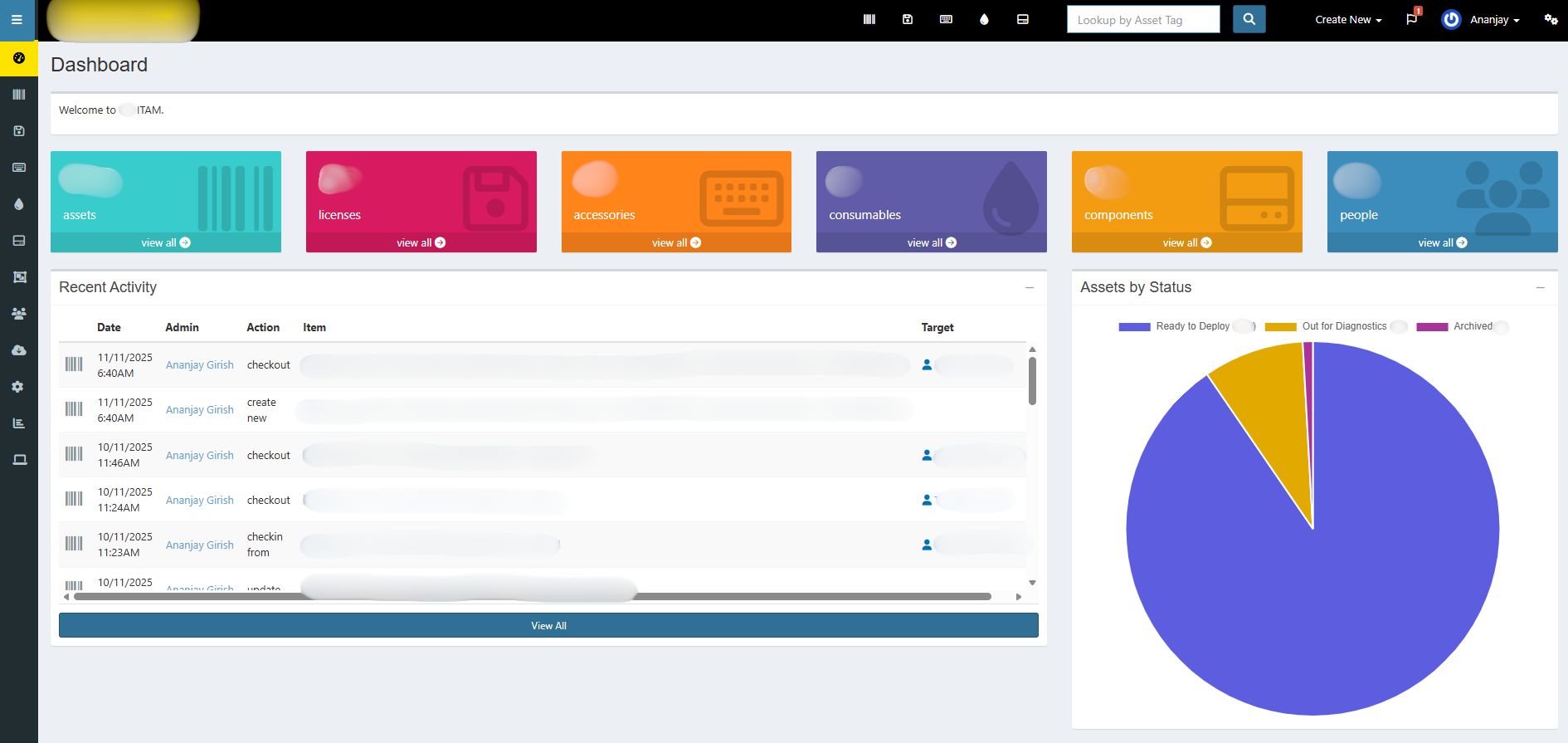
- SnipeIT - Open-source IT Asset Management
- Hosted the application on an EC2 Instance
Impact
Tracking and tagging assets with custom IDs became easy, and assigning or reassigning them across teams was much faster. Instead of scrolling through hundreds of rows, assets or collections of them could be found instantly with simple keyword searches. Managers were finally happy, audits became smoother, ownership was clear, and every device could be labeled with the right status in seconds. Basically made my job easier than ever on the asset front.
Wazuh SEIM and Log Analysis
Project Documentation
In my early days, I wasn’t fully familiar with what a SIEM was, but the concept immediately intrigued me. This curiosity was further pushed when a colleague of mine suggested that we explore and experiment with Wazuh. So I set it up in my homelab. That hands-on testing became the foundation of my understanding of modern detection and monitoring tools.
Tools & Setup
- Proxmox VE - Used to virtualize and manage both servers and endpoint machines.
- Wazuh Manager VM - Central SIEM platform that collects, normalizes, correlates, and alerts on security events.
- Windows 11 VM - Configured as an enterprise-like workstation with Wazuh agent installed.
- Kali Linux - To simulate attacks and scenarios.
1. Brute-Force Login Attempt
Starting with an easy-to-detect event like a brute-force attack, the first step I took on the VM was enabling the necessary audit policies so Wazuh could capture those attempts.
              auditpol /set /subcategory:"Logon" /success:enable /failure:enable
              auditpol /set /subcategory:"Account Lockout" /failure:enable /success:enable
              auditpol /set /subcategory:"User Account Management" /failure:enable /success:enable
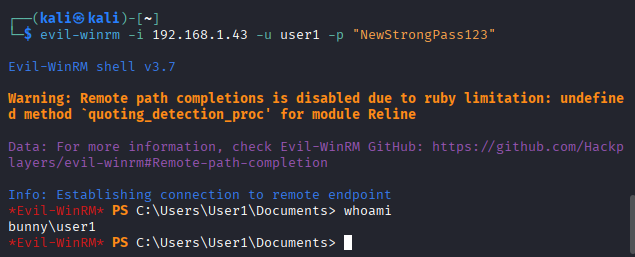
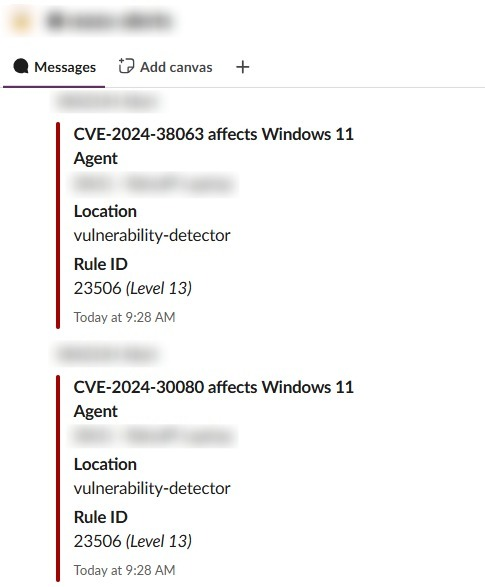
To test brute-force detection, I first locked the VM and entered incorrect passwords until the threshold was reached. Since that scenario is too manual and all too common during routine password resets (trust me I know), I pushed the test further by using Kali Linux with evil-winrm and the rockyou.txt password list. Some screenshots of the attempts and alerts. Also at the end, manually tested with a dummy password to confirm brute force access.
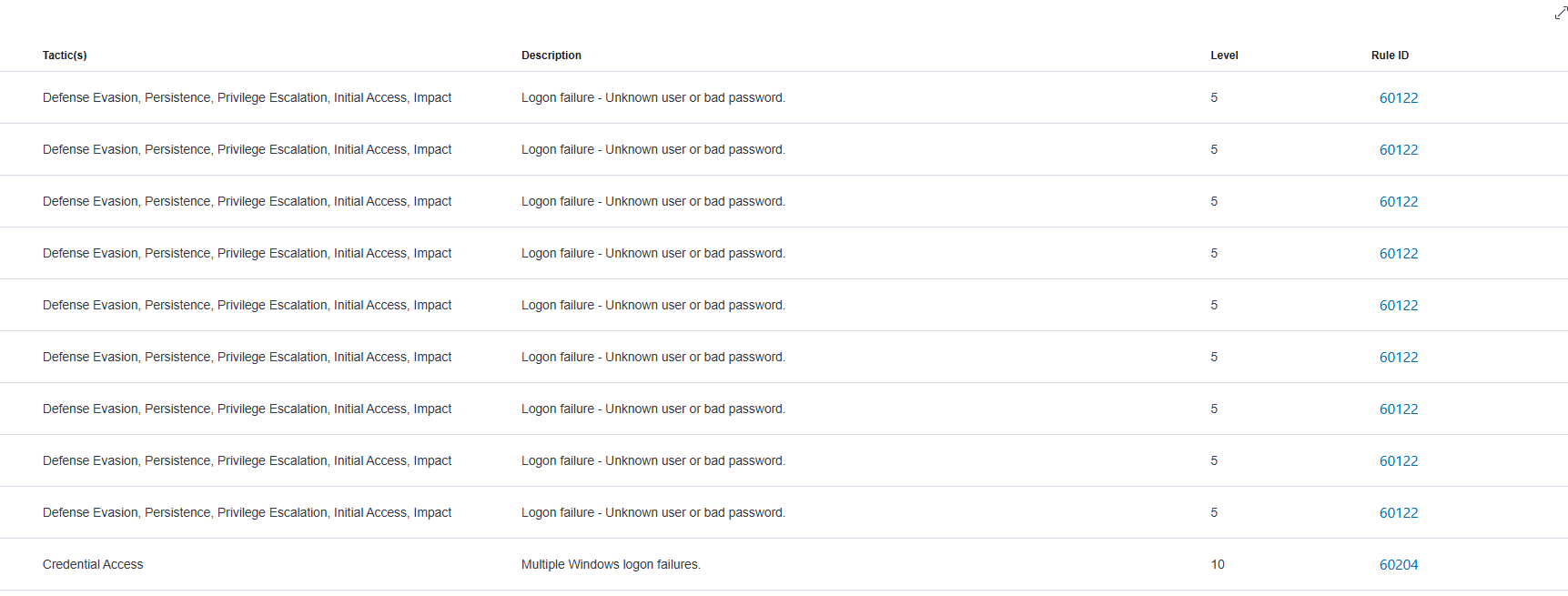
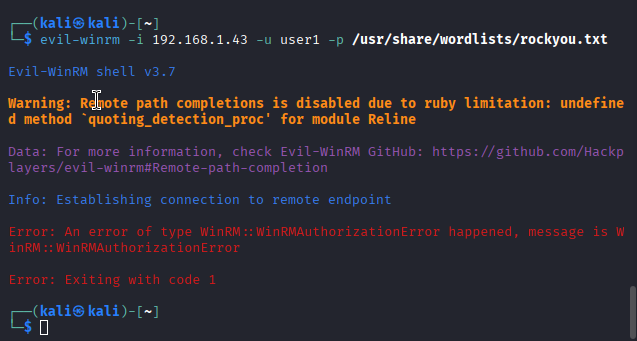
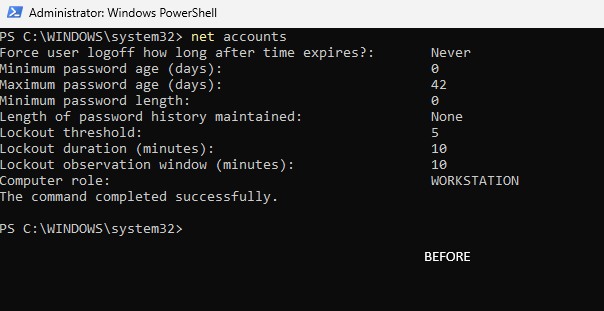
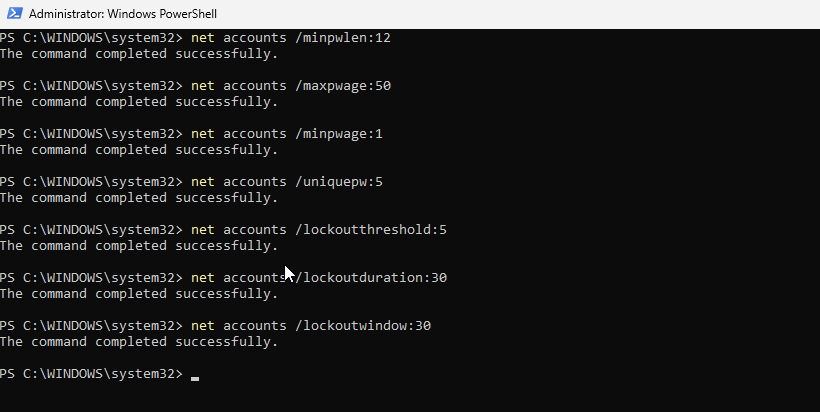
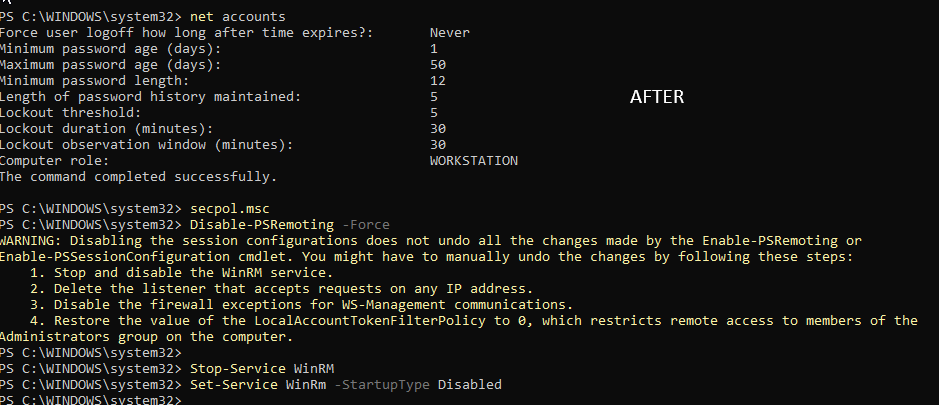
I had more testing to do, so I didn’t go too deep into hardening. I only made changes that I could easily roll back, such as adjusting the password policy and disabling the Remote Management service.
PRTG - Monitoring Websites and more
Project Documentation
I am a big supporter of open-source. The main reason being there are literally tools out there that can get things done with zero cost.
Tools & Setup
- An old system with a decent spec and storage.
The setup
I set up this because I hate discovering issues only after users report them. Sometimes a website feels slow not because of our network, but because traffic is being routed inefficiently.
I once saw a console load instantly one day and take 4–5 seconds the next due to a routing change, something the ISP never notifies us about.
To catch this early, I used PRTG to monitor key domains with triggers for latency and downtime. Now I can immediately see when routing or availability changes and act before users complain. The only downside: one more screen to watch.
Solar Winds Kiwi Syslog Server
Project Documentation
Network logging is a risk control mechanism and is especially important in smaller organizations, as it helps identify security threats and provides traceability when incidents occur. Setting up Kiwi Syslog was done for this purpose.
Tools & Setup
- An old system with a decent spec and storage.
- SolarWinds Kiwi Syslog.
- Firewall that supports logs monitoring and aggregation.
- Cloud Storage.
The setup
Without network logging, tracing the origin of a system or security incident becomes difficult. I initially attempted syslog collection through PRTG but realized it is designed primarily for monitoring rather than centralized logging.
I confirmed firewall support and configured an older laptop with a static IP to receive logs, avoiding storage on the firewall itself (which could impact performance) and the built-in cloud retention limited to seven days.
I also created a custom batch script to archive logs locally and sync them to Google Drive for long-term retention. I ensured that the firewall was not overloaded by excessive logging traffic as well.
Secret Santa for the Organisation
Project Documentation
I am not sure if I should include this as a project, but this something I had a lot of fun making for my organisation. I felt compelled to share it because it comes with a valuable lesson and a story of a security misstep on my part.
Tools & Setup
- Wix.com for domain and hosting
- CMS (Content Management System)
Educational Moment
I like to wear many hats. One of them is a junior web developer and now with the advent of AI, building anything is easy if you know the logic behind it. As part of the operations team, I was asked to build a simple secret santa page for my org. Just a login page were people could sign in and click on a Christmas tree to reveal their assigned friend. This was in december 2024. Due to time constraints, I created a webpage using basic code referenced online and assumed the CMS hosting would ensure data security. It didn’t.
The code I wrote returned a response back which was, in my defence was encrypted. My colleagues in the development department spotted this and decoded it, and saw the filter query I had used to fetch each user name and their Secret Santa match. By adjusting that query, they were able to retrieve the entire list of participants and their assigned friends in JSON.
This was pretty embarrassing because I had completely depended on the tech to hide everyone’s data. When the opportunity came around again this year, I decided to do it right. I went and spoke to the backend team to understand how to avoid the mistakes I made last time. I set up a separate backend script to handle all data calls from the CMS. By seperating the frontend and backend, I was able to make the system much more secure. And just to be safe, I ran the demo script with the backend team to check if anything had been overlooked. Thankfully, they all gave a thumbs up.
I also updated the login tokens to 16-digit alphanumeric strings to prevent brute-force attempts and locked down the CMS as much as possible. A sample of the new website is shown below. This was just to entertain all the folks at our office. Anyways; another solid lesson learned as always.
Added a tiny puzzle game inside so there was something our teams could interact with before their friends name, photo and address was revealed.
Wanted to end on a fun note. Many more to add and update... Thank you for reading !